
You are currently browsing the category archive for the ‘web’ category.
This is an experimental post. Why? Because I’m checking out ScribeFire.
And there’s also the fact that I got a whollotta nothin’.
Wait, there is one thing. For three more hours (5 for her) it’s still Julie’s Birthday!
Wish her a happy. Tell her I sent you.
Remember what I said yesterday about that script being nifty?
Yeah, well. Not so much.
Look a little more closely at the picture (which is reinserted below) and see if you can tell why.
Heh.
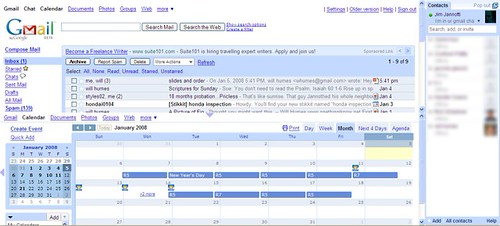
Lifehacker tells of Enhance Gmail, a greasemonkey script that lets you put gcal, gmail and gchat on the same screen. Nifty.
Here’s what it looks like after a bit of easy script tweaking by moi…
My script ‘hacks’ were as follows:
I changed the operand in the statement ‘const OPEN_CAL_BELOW_MAIL=0’ from ‘0’ to ‘1’ [this opens calendar in the bottom of the screen instead of to the right]
I also changed ’70’ in the statement ‘const CAL_HT = 70′ to a ’50’. [This keeps the calendar to 50% of the screen instead of 70%]
To edit the script simply open your greasemonkey script manager and click edit. You may need to specify a .txt editor if you haven’t edited a script before. Don’t be afraid… I survived and I’m a code idiot.
This post at makeuseof.com no longer applies to me. A while back, I de-outlooked.
In place of the overly cumbersome, memory devouring calendar/email behemoth, I substituted thunderbird with its calendar add-on (lightning), both of which are linked to gmail and gcal. Google Calendar has been doing some decent integration work which allows me, in some cases, to create a calendar entry from an email. This feature has a ways to go.
Because of that distance, I’ve also started using Sandy to manage reminders and to-do items. She’s a virtual personal assistant who has way more capabilities than I’m using. The cool thing about her is that after adding a short email address into my Thunderbird and gmail contacts, Sandy works faultlessly and invisibly. I never have to visit her website at all.
Sandy is built on the stikkit engine. I’ve posted about stikkit before.
I know it sounds complicated, using four different apps to manage to-dos, calendar, and email. But it’s actually easier than using Outlook ever was. It’s also quicker. Much, much quicker! No more spending two or three minutes waiting for Outlook to fire up. Those are minutes I can use to worry think about how many deadlines I have to meet this week.
[So yeah, about five and a half seconds after I posted this, Will pops up and says “I have IMAP! All I did was log out and log back in.” There may or may not have been a silent razzberry in there too.
I dutifully logged out and loogled back in, and…]
Even though I say nice things about it and pet it every day.
I [still] have no gmail 2.0 yet. Not even IMAP.
C’mon g, don’t do me like that!
There’s a dual purpose to this post. Okay three purposes.
a. To tell you about something new from google
2. To tell you about the blog from which I got it
– It’s 8pm and I haven’t posted yet today.
Google will soon be introducing a new version of gmail. They announced IMAP support for gmail a few days ago and created quite a buzz around the web, but I find the prospect of a newer, faster, more versatile version of the program to be much more exciting. According to the blog Google Operating System (more about that in a moment), the new gmail will include
- pre-fetching messages
- a new contact manager
- increased integration across google web apps.
It’s that last one that will potentially make gmail the killer online application. One thing I wish gmail would do currently is allow you to create a google calendar event based on an email with one click. It will eventually, and maybe even in this coming new version. Word is that the new contact manager will also work with gdocs and gcal. I’m hoping for a large leap toward full integration of calendar, gmail, and docs. Flippin’ sweet!
Now, about that blog. Google Operating System is written by Ionut Alex Chitu, who describes the nature of his reporting on his about page.
I didn’t invent the concept of Google Operating System, I just wanted to tell its story. The platform is already there, some pieces are already built, but Google’s operating system will continue to amaze us in the years to come.
You’ll find news, tips, secrets, analysis, written in a way I’d like to read them. But nobody writes them elsewhere. [link is from the gOS blog]
Unlike some other google watchers, Mr. Chitu zooms in with laser clarity on features that play into google’s larger ambition to be an online operating system that, as he puts it, “stores and processes our documents, memories and desires.” His post topics range from the quizzical to the diabolical to the whimsical.
Google Operating System can now be found among the selection of high quality blogs on the roll.
Stikkit is a web based to-do list/calendar/notepad application. Skip down below the divider if you want the review without the personal background.
I started using it today and my initial impressions are positive. It’s always been hard for me to keep any kind of schedule, even when I’m busy. The keeping of the schedule becomes a task in itself. Mis_nomer seems to be suffering through such a situation right now. I feel her pain.
Upon entering the working world in 1989 with an MBA and a job at an advertising agency, I bought myself a scheduler. Not one of those filofax/life planner things that were common at the time, but a little book with a calendar in it. I used it religiously and it drove me crazy. When I entered ministry in 1993 I took my calendar book with me and also bought one the following year; both of which were virtually empty when I threw them out. Having discovered Outlook, I made to do lists and kept a calendar for years almost as an act of holy obligation, but eventually I stopped doing even that.
I’ve gone so far as to evict Outlook from this notebook entirely and am now using Google calendar (synced with the calendar in Thunderbird) for all my appointments and for keeping track of which routes I’ve delivered.
However, I still sometimes find myself making short lists of to-do items (things like, ‘go to atm’, or ‘pick up girls from school’) and also making notes about what songs we’ll be doing for worship this week and such. Plus, I am occasionally in immediate need of the ability to take notes. Like when I’m working on an article and one of my contacts calls up and can talk for five minutes right now but will not be available again for at least a century. Stop laughing. This happens at least once for every article I write. As any good reporter should, I have a pen and notebook with me all the time… but have you ever tried to read my handwriting? Probably not, and you couldn’t even if you did. Most of the time, I can’t either. It’s that bad.
Stikkit is perfect for these moments and many others besides. At least, that’s my initial impression. Here’s the thing though…
+++++++++++++++++++++++++++++++++++++
Stikkit is so incredibly intuitive that it confused me at first. I’m used to web apps that are super-dumb. If you want to be reminded that your kids are counting on you to pick them up, there should be a key combination or on screen button or tab or special dance you have to do in order to get the “set reminder screen” to come up, right? Not anymore.
Want a reminder? Open a new stikkit, type something like “today 2:30pm. Pick up girls. Remind me.” Stikkit sends a reminder to your email address (or to your phone via SMS). It also automatically recognizes such an item as a calendar item. Open up your Stikkit calendar (which syncs with your Google calendar, btw) and there’s your date, already listed. The program uses certain magic words, “remind” being one of them. More info on how it all works is included in this post at 43 Folders.
Don’t want a calendar entry or a reminder? No problem. Just don’t type those things in your new stikkit. Your stikkits page still includes it but your calendar and to-do list do not. You can also tell stikkit to stop being so smart.
The only problem, as far as I can tell, is that there is no offline Stikkit… but I could be wrong. This is why I will be keeping Shock Sticker for now.
Stikkit is brought to you by Values of N, whose most recent creation Sandy, is an email personal assistant. I don’t get nearly enough email to warrant Sandy, but it seems like a good idea.
Technorati tags: values of n, stikkit
viewat.org is a very cool website that allows photographers to display their panographs, or panoramic photographs. It also offers step by step instructions on how you too can create and upload your own panographs. As the site says, the process is not hard, but it is complex. At least, it looks complex, I haven’t tried it.
 There are some great panoramas here, but this panorama of the flight deck of a 747 totally fascinated me. Click on the thumbnail to link to the panorama.
 Yes, it is true. Google Reader is a much better web application than it once was. It is quicker, easier to use and has better features than its first and relatively inauspicious version.
But Bloglines beta is all that plus a bag of chips. Simply put, bloglines beta does almost everything that Google Reader does and in addition sports a better, easier to read layout. It’s also more visually attractive than the original bloglines but I don’t really care about that. One thing that bloglines beta does much better than Google Reader is subscription management. The two readers are almost twins in terms of functionality. Google has a separate feed management ‘page’ where you can select a number of feeds and accidentally delete them all with one click! Or do something useful like rename them or change their folders.
Bloglines feed management, though lacking any bulk update capability that I can see, lets you do all your editing right on the main viewer page. Want to change folders? In bloglines, you just drag the item to the new folder. That’s it.
Plus, bloglines lets you choose which feeds get displayed on your start page. Google defaults to “What’s New” , aka unread items.
But, you say, Google lets you star items!
Well, in bloglines you can “pin” an item, which is exactly the same as “starring” it in google.
Bloglines does not let you see all your pinned items at one time, which Google does. That feature of Greader is not one I used at all during my side by side trial of the two, so I’m concluding that I don’t need it. But if “view starred items” is something that you need, Bloglines doesn’t have it… yet.
Further, Bloglines’ cleaner look, with more space between lines of type in the feed list, and right adjusted unread counts, is more appealing to me than Google Reader’s comparatively cluttered look.
 Finally the folks at Bloglines seem hungrier. I sent them an email about a feature from the original bloglines that has not yet been transferred over (that feature, by the way, displays the number of unread and also the number of pinned items from your library in the bloglines browser tab). I got an email response in less than twenty four hours that said basically, “it’s coming!” Requests for features or anything else which are sent into the Googlesphere are rarely heard from again. Though, I must say that in the Google Calendar forum, I got a pretty quick response when I couldn’t delete any events.
It was close, but Bloglines is the winner.
I still like Google and most of their apps. Gmail makes mincemeat out of every other web mail application I’ve tried, the same goes for Google Calendar in its field. Google Docs is awesome even if its formatting capabilities aren’t quite there yet.
I did receive a couple of suggestions about other readers and I tried each one. Newshutch, as far as I’m concerned is a non starter, mostly because it didn’t start [i.e. wouldn’t let me load my opml file]. Spokeo is like the USA Today of feed readers… it’s fine if you like cartoons and lots of colors.
All you hardcore Google Reader users out there (this mean you, Beth)… these two offerings are so close that I wouldn’t recommend switching if you’re already using one of them. But if you’re on the fence, Bloglines Beta (the Beta, not the original… there’s a big difference) is the way to go.

The head to head battle between bloglines and Google reader heated up this morning!
A few weeks ago bloglines released a new version in beta. I looked at it only briefly before swithcing back to the old standby version, figuring I’d wait for more of the features to be added in. Just this morning, TechCrunch’s Duncan Riley reported on a few new features that have been added to the new beta, including openID, which allows users to log in across the web using one unique ID.
Over on the bloglines blog, you can read about the myriad features they’ve been incorporating here, here, and here.
Another positive development is that infuriating hanging that bloglines used to inflict upon me seems to have vanished with the beta. Good news. I don’t know, all you people in the cult of greader… this is getting interesting.
More to come.


 serotoninrain
recent comments