
Lifehacker tells of Enhance Gmail, a greasemonkey script that lets you put gcal, gmail and gchat on the same screen. Nifty.
Here’s what it looks like after a bit of easy script tweaking by moi…
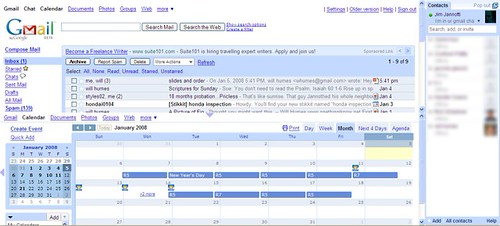
My script ‘hacks’ were as follows:
I changed the operand in the statement ‘const OPEN_CAL_BELOW_MAIL=0’ from ‘0’ to ‘1’ [this opens calendar in the bottom of the screen instead of to the right]
I also changed ’70’ in the statement ‘const CAL_HT = 70′ to a ’50’. [This keeps the calendar to 50% of the screen instead of 70%]
To edit the script simply open your greasemonkey script manager and click edit. You may need to specify a .txt editor if you haven’t edited a script before. Don’t be afraid… I survived and I’m a code idiot.


 serotoninrain
1 comment
Comments feed for this article
January 5, 2008 at 11:12 pm
Rach
We should add each other to our g-chat so we can chat (excuse the pun!).